
We’ll cover everything you need to know about dielines and how to read and use them for your own custom packaging projects.
Dieline Definition
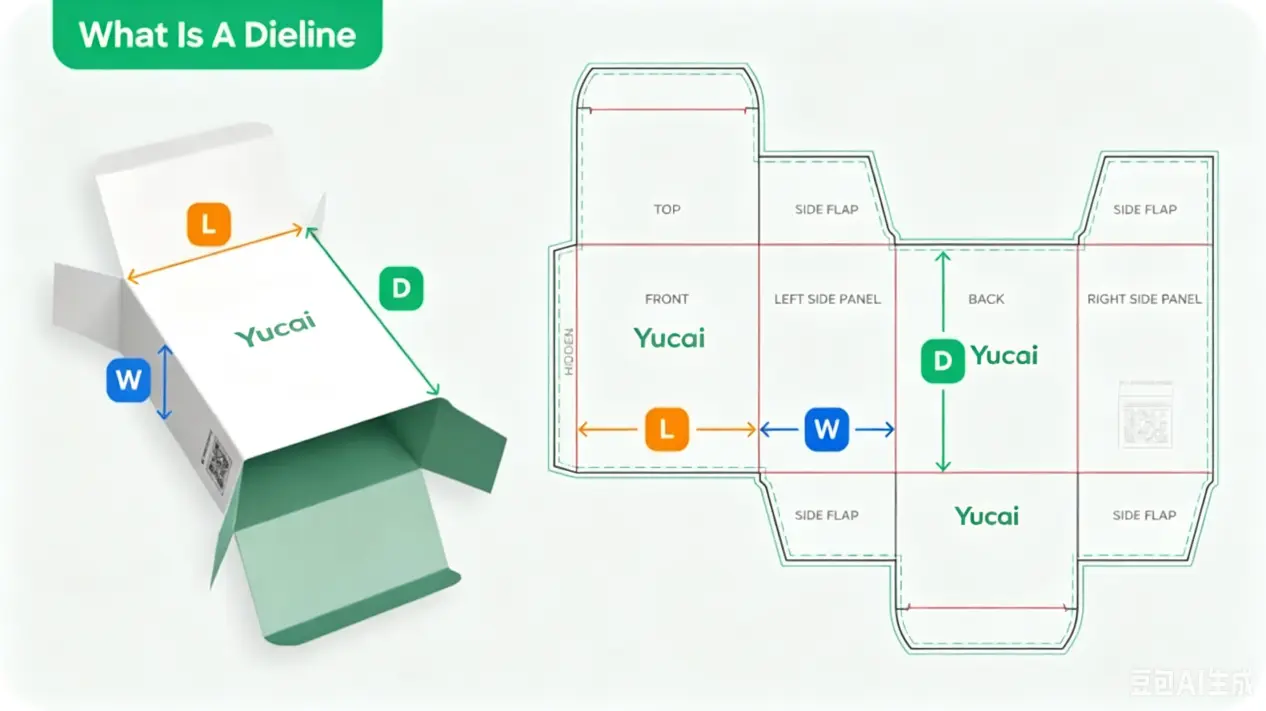
In the field of packaging and printing, the dotted line (dieline) is a design scheme used to precisely define the layout of the packaging. It provides designers and manufacturers with guidelines to ensure that all visual elements—such as cutting lines, folds, release lines, and safety zones—are clearly indicated on the flat packaging drawing before production. By referring to the dotted line plan, you can visualize the different sides of the box from the packaging's flat structure, adjust the artistic design according to specific packaging requirements, and accurately determine the position and arrangement of components.
Why Dielines Are Important
Error detection and correction
Sketching is a crucial step in packaging design, allowing the designer to check, identify, and correct issues related to layout, structure, arrangement, or dimensions before finalizing the project. As a result, multiple revisions and improvements are typically required to achieve an optimal outcome. Once the sketch is approved, the next step involves using 3D rendering software to preview the concept.
Visualize your continuous online graphic in 3D
By importing your continuous online graphic into 3D rendering software such as Pacdora or Esko Studio Illustrator plugins, you can generate a digital prototype that intuitively shows the final appearance of the packaging once assembled.
This essential step helps ensure proper arrangement and positioning of visual elements while also enabling detection of design flaws difficult to identify in two-dimensional layouts. 3D visualization allows you to evaluate the practicality of design choices, such as the functionality of folding lines, hole placement, cutting precision, color visual effects, and even carton dimensions and style. Finally, but equally important, sharing these 3D prototypes with stakeholders or clients enhances communication and streamlines approval processes, ensuring a smoother and more error-free packaging design workflow.
Dieline Examples
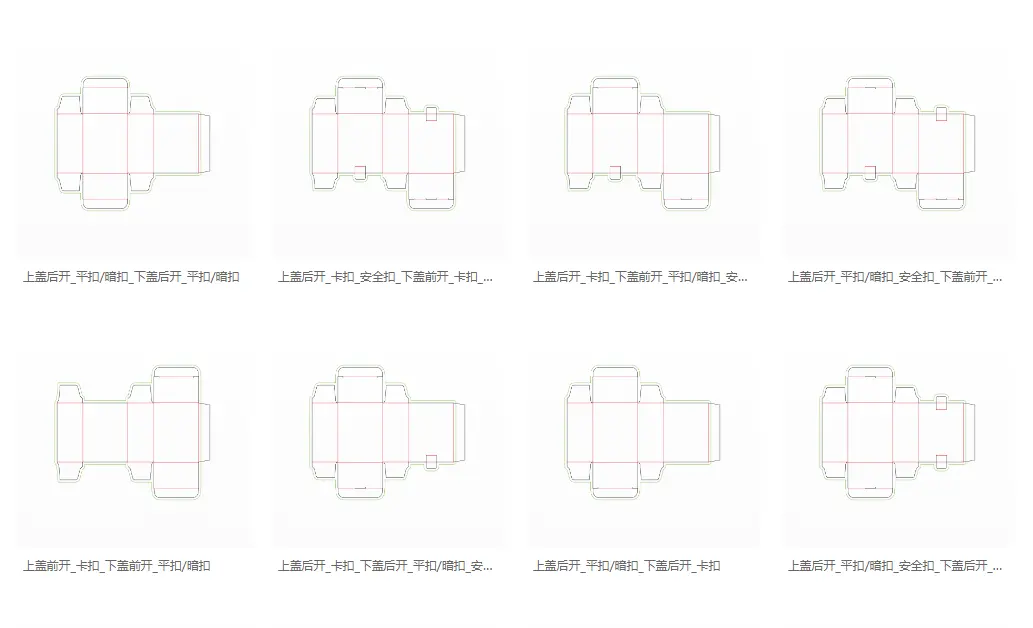
Here are some dieline examples to show what a dieline looks like for different types of packaging.
How to Read Dielines
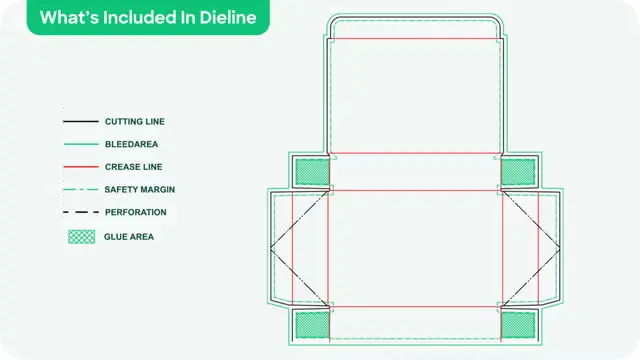
Trim lines — displayed in black, they indicate the areas where the cutting machine will make the cuts. These lines essentially form a precise outline of the final dimensions of the packaging design after cutting.
Overflow line — represented by a solid green line, it indicates the additional printing area located beyond the cut line, known as the overflow zone. This zone typically extends 0.125 inches (3 mm) beyond the final cut line to compensate for slight shifts caused by packaging material during mechanical cutting. By extending graphic content up to the overflow line, you can prevent important elements from being cut or avoid an unnecessary white border on the finished product.
Quick tip: It is recommended to extend non-essential elements such as background images and graphics up to the overflow line, while central areas like text and logos should remain within the secure zone inside the cut line.
Folding line (fold line) — indicated by a continuous red line, it marks areas that require folding or pressing during the manufacturing of the final three-dimensional shape of the packaging.
Safety line (margin lines) — represented by green dots, it indicates secure zones for all important graphic elements in the design (such as logos and text). These elements must remain within the safety line to prevent being cut during the cutting process. Thus, even if the cutting machine slightly deviates inward beyond the cutting line, everything inside the safety line will be fully preserved and not cut.
Perforated line — indicated by black dots or dotted lines — shows areas on the packaging that require perforation to facilitate folding or tearing. This type of line is typically used for packaging that needs to be easily opened or separated.
Colle (sealing label) — represented by a green cross-shaped patch, indicates the areas where glue or adhesive must be applied during packaging production.
The Die-cutting Process
Once the folding pattern on the packaging material has been printed, the cutting phase begins. This involves using a large metal mold and a custom-cutting blade whose shape precisely matches the folding design of your packaging. First, the material is fed into the cutting machine, where powerful rollers and a cutting blade press the metal mold accurately into the material. This process results in a clean, precise cut that conforms to the specifications of the folding pattern, after which the material can be folded to form the final three-dimensional shape.
Let Yucai Help You Create a Dieline for Your Package
As you can see, dielines play a crucial role in the final appearance of packaging. Therefore, it's essential to understand what an dieline is and how to implement it.
Are you neither a designer nor a manufacturer? Don't worry! Yucai offers comprehensive services to meet all your custom packaging needs, including design, structural engineering, and much more.
FAQ
1. What is the MOQ for custom boxes?
No MOQ,more qty,lower unit price.
2. Can I order a sample before mass production?
Yes. Yucai provide samples so you can check size, material, print quality, and overall appearance before placing a large order.
3. How long does production usually take?
Production time depends on customization and order quantity. Standard orders may take 7–15 business days, while complex designs can take longer.
4. Will custom boxes increase shipping costs?
Not necessarily. Choosing the right size and lightweight materials can help reduce unnecessary shipping expenses.
5. Can I customize the box size for my products?
Yes. Custom sizing is available to better fit products, reduce movement during shipping, and improve presentation.
6. Are custom boxes suitable for international shipping?
Yes, but material strength and box structure should match shipping distance and product fragility.
7. Can I reorder the same packaging design later?
Yes. Yucai save design files and specifications, making future reorders faster and more consistent.
Post time: Jul-30-2026